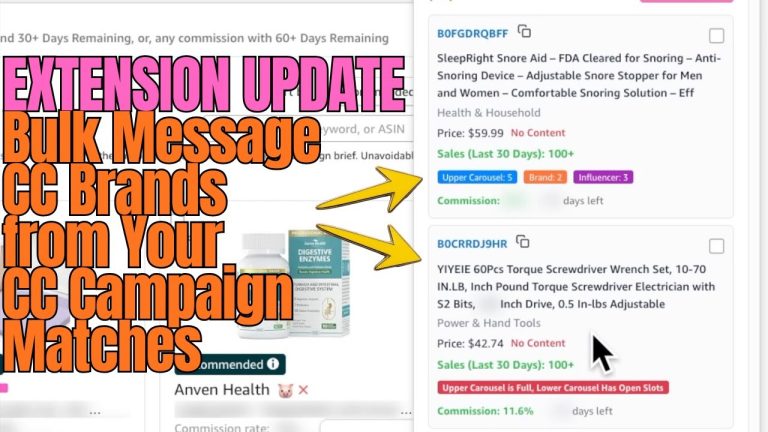
I just shipped a feature inside Oink for Influencers that I’ve been wanting for over a year, and if you take Creator Connections seriously, this is going to change your morning routine. It’s called Quick Creator Connections X Storefront Check, and it does exactly what the name says — it cross-references every active Creator Connections offer against your own storefront in seconds. Here’s why I built it and how to actually use it.
The Problem This Solves
Anyone who’s been in Creator Connections for a while knows the pain. You scroll the offer feed, see a brand offering a 3% bonus commission, get excited, and then have to manually check your own storefront to see whether you already have videos on that brand’s products. Why does that matter? Because if you already have content on those ASINs, accepting the offer means immediate uplift on existing videos — that’s basically free money. If you don’t, you’ve got to weigh whether it’s worth filming new content. Without a fast way to check, most creators just guess.
What Quick Creator Connections X Storefront Check Actually Does
The feature pulls the live Creator Connections offer list, pulls your storefront’s full ASIN inventory, and runs an intersection in real time. Every Creator Connections offer now shows you exactly how many of your existing videos would benefit if you accepted it. No more bouncing between tabs. No more spreadsheet exports. You see the offer, you see your match count, and you decide.
Why Match Count Is the Most Important Number
If a brand offers a 2% bonus and you have 40 videos on their products, that’s 40 videos that immediately start earning more — and most of them have already accumulated views, ranking, and Amazon’s organic distribution. Compare that to accepting an offer where you have zero existing content. Now you’re filming new videos from scratch, hoping they perform, and waiting weeks before you see meaningful commission. The match count tells you which offers are sleeping money versus which are speculative bets.
Prioritizing Your Offer Queue
Here’s how I run my queue now. I sort offers by effective commission first — that means base commission plus any Creator Connections bonus plus the relevant category rate. Then I sort by match count. The offers that float to the top of both lists are no-brainers. I accept those instantly. The middle of the list is where I evaluate whether new content is worth shooting. The bottom of the list, with low commission and zero matches, gets ignored. That used to take me an hour. Now it takes about two minutes.
What “Cross Check” Really Means
The “X” in the feature name stands for cross-check, and that’s intentional. Most tools show you Creator Connections offers in isolation, like a feed. But an offer in isolation is meaningless — what matters is the offer in the context of your specific storefront. A 5% bonus offer on a brand you’ve never touched is worth way less to you than a 1% bonus on a brand where you have 60 videos. The cross-check is what turns a generic feed into your personal opportunity list.
A Real Example From My Own Storefront
Last week I had two offers staring at me. One was 4% from a brand I had zero existing content on. The other was 1.5% from a brand where I had 78 videos on file. Without cross-checking, I would have grabbed the 4% offer in a heartbeat — bigger number, obvious choice. The cross-check showed me the 1.5% offer was going to compound across nearly 80 already-ranking videos with active view streams. I accepted both, but I prioritized retagging and pushing the 1.5% videos first because that’s where the immediate commission lift was happening.
How This Pairs With Storefront Cross Check
If you’ve used the existing Storefront Cross Check inside Oink, this new feature is the natural Creator Connections companion. Storefront Cross Check tells you what’s healthy and what’s broken in your storefront. Quick Creator Connections X Storefront Check tells you which incoming offers can actually move the needle for you specifically. Together they give you a closed-loop view: what you already have, and what’s available right now to make what you have more profitable.
Where to Find It Inside Oink
Open Oink, head to the Creator Connections panel, and you’ll see a new column labeled “Storefront Matches.” Click any offer to see the matched ASINs broken down by video, view count, and current commission rate. From there you can accept the offer in one click and queue up retagging if you want to optimize the matched videos for the new commission structure. The whole flow is built to be done in a single session, not spread across three tools.
What This Means for Your Daily Workflow
If you check Creator Connections every morning — and you should — this feature collapses the decision time on each offer from minutes to seconds. Multiply that across a daily review and a weekly retagging session, and you’re looking at hours saved every week, plus better acceptance decisions, plus more commission flowing from videos you’ve already shot. That’s the kind of leverage I built Oink to deliver. If you want to try it on your own storefront, you can grab the extension at oinkforinfluencers.com and have it running in a couple of minutes. Once you see your match counts, you won’t go back to scrolling Creator Connections blind.