Walmart is on fire right now. The on-site creator video beta is rolling, the off-site commission rates are strong, and shoppers who would not have clicked a Walmart link six months ago are suddenly loving Walmart deals. So I built a new Oink feature for Pro subscribers: grab Walmart products, let the Oink AI write your deal posts, and cross-post them straight into your Facebook deals groups in bulk. It works side by side with Amazon, so you can run a mixed queue and post both in one sitting. Here is the full workflow.
In This Article
- Why Walmart Deals Groups Right Now
- Adding Walmart Products to Your Queue
- Letting Oink AI Write the Posts
- Walmart Compliance You Cannot Skip
- Running Amazon Through the Same Queue
- Adding Product Images from Walmart Creator
- Setting Your Walmart Deep-Link Option
- What This Means for Your Off-Site Income
Why Walmart Deals Groups Right Now
Most of us built our Facebook deals groups on Amazon links. That still works. But the Walmart Creator program pays off-site commissions that compete with and often beat Amazon’s category rates, and the audience is there. Deals groups that used to groan at a Walmart link are now asking for them, partly because Walmart’s pricing on everyday categories has been aggressive and partly because the delivery experience has caught up.
The problem was never demand. It was the workload. Writing fifteen deal posts by hand, pulling images, generating links, and pasting into groups one at a time is an hour of work for a few dollars of commission. That is the gap the new feature closes.
Adding Walmart Products to Your Queue
With Oink Pro installed, browse Walmart the way you normally would. On any product page, or on a deals or rollback listing, you get a one-click add to your Oink Facebook post queue. Hit it on ten products and you have ten items staged. No copying URLs, no spreadsheets.
Each queued item pulls the product title, current price, and your Walmart Creator affiliate link automatically. The price matters because Walmart requires you to post it, which I get into below.
Letting Oink AI Write the Posts
Once your queue is loaded, one button has the Oink AI write every post at once. It generates a short, deals-group-style write-up for each product: what it is, why the price is good, and the link. You can edit any of them before posting, but in practice I rarely touch them beyond trimming a line.
The important part is that the AI is trained on the Walmart disclosure requirements, so the compliance language is baked in rather than something you remember to add. Fifteen posts written in about twenty seconds.
Walmart Compliance You Cannot Skip
Walmart is stricter than Amazon about how you present affiliate posts, and they will pull creators who ignore it. Three rules the feature handles for you:
- “Walmart partner” disclosure at the top of every post. Not at the bottom, not buried in a hashtag. Top of the post, every time. The AI puts it there by default.
- Post the price. Walmart wants the current price in the post so shoppers are not surprised. Oink pulls it from the product page when you queue the item.
- Use deep-linked Walmart short links. Your link needs to go straight to the product, not the home page, and it needs to carry your creator tracking. Oink generates the deep link for each item.
If you have been posting Walmart links manually without the partner disclosure on top, fix that today regardless of whether you use Oink.
Running Amazon Through the Same Queue
This is not a Walmart-only tool. The Amazon side has been there for a while, and now both live in one queue. On Amazon, open a coupons page, bulk-select the products you want, and Oink stages them with Genius deep links already created.
Before you post, Oink checks each Amazon product for two things that change what you should write: whether there is an active Creator Connections campaign on it, and whether there is a sponsored product opportunity. If a product has a Creator Connections campaign paying an extra 10 percent, you want that one at the top of your post order and you want your campaign link on it, not a plain affiliate link. The check surfaces that without you leaving the queue.
Then you work through the mixed queue. Walmart item, Amazon item, Walmart item. Same workflow, same post button.
Adding Product Images from Walmart Creator
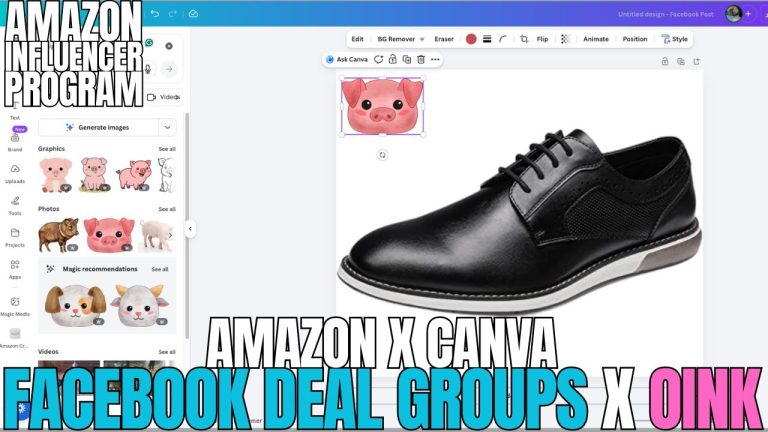
Text-only deal posts get buried in a busy group. Oink integrates with the Walmart Creator design tool so you can attach a product image to each post from inside the queue. Pick the product, pull the image, and it rides along with the post. For Amazon items the product image comes through the same way.
In my groups, posts with an image get roughly double the clicks of text-only posts on the same product. That is not a small lift when you are posting fifteen a day.
Setting Your Walmart Deep-Link Option
In the Oink cross-posting settings there is a new custom Walmart deep-link option. This is where you tell Oink how to build your Walmart links: which creator ID to use and what link format you want. Set it once and every Walmart post in the queue uses it. If you run multiple Walmart Creator accounts or want different tracking for different groups, this is where you switch.
What This Means for Your Off-Site Income
On-site Amazon commissions are capped by how many products you can shoot and how many of those videos Amazon places. Off-site income scales with volume and reach, and deals groups are the highest-volume channel most of us have. Adding Walmart to that channel is a second commission stream running through the same audience you already built. The feature takes what used to be an hour of manual work and makes it a ten-minute session.
Watch the full walkthrough, from finding products to hitting post:
The Walmart Facebook bulk posting feature is live for Oink Pro subscribers now, alongside Storefront Cross Check, Comparison Video Schedule, Unavailable Video Matching, and the 5 Pillars system. Get Oink at oinkforinfluencers.com and start posting Walmart deals tonight.