If you wake up every morning and start firing off messages to brands, I want you to stop for a second and be honest with yourself about what that actually is. It’s a lottery ticket. Most of those messages never get opened. The ones that do get opened are sitting in a pile with a hundred other creators who wrote the exact same thing. Meanwhile, there is a list of winning products sitting in your house right now that you already paid for and never made a single video for. I had 647 of them when I recorded this.
In This Article
- The Brand Outreach Lottery
- What the Order History Content Gap Actually Does
- How to Run It, Step by Step
- If You Have Under 100 Videos
- If You Have Over 100 Videos
- Why Creator Connections Overlap Is the Hidden Win
- The Stuff You Stopped Seeing
- Work the Backlog Before You Work the Inbox
The Brand Outreach Lottery
I’m not going to tell you brand outreach never works. It works sometimes. But look at the math on it honestly. You spend an hour writing messages. You have no control over whether they’re opened, no control over whether the brand is even running a program, and no control over the timing. Best case, you hear back in three weeks. Worst case — and this is the actual case most of the time — you hear nothing at all and you have nothing to show for the hour.
Compare that to an hour spent filming a product you already own, that is already selling, that already has a live campaign attached to it. One of those hours produces an asset. The other one produces hope.
The reason people default to outreach is that it feels productive. It feels like hustle. Filming the air fryer that’s been sitting in your kitchen for eleven months doesn’t feel like hustle, because you’ve walked past it four hundred times and it stopped registering as an Amazon product a long time ago. That is exactly the problem I built this feature to solve.
What the Order History Content Gap Actually Does
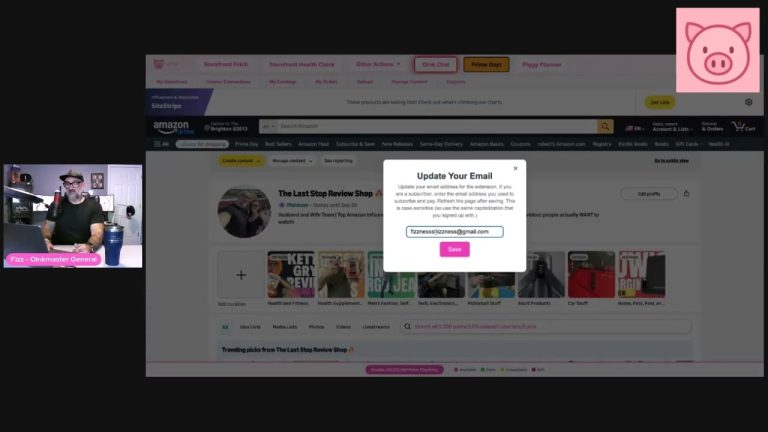
The Order History Content Gap takes everything you have ever ordered from Amazon, cross-checks it against the products you have actually tagged on your storefront, and hands you back the difference. Not a spreadsheet. Not a data dump. A working queue, 20 products at a time.
That gap is the single most underrated asset in your business, and here’s why: every product in it has already cleared the two hardest hurdles. You already found it, and you already bought it. You did the research, you spent the money, the thing is physically in your house. The only step left is the one that actually pays — pressing record.
Oink layers three more things on top of the raw gap so you’re not filming blind:
- Whether the product is actually selling, so you’re not burning a Saturday on something with no demand
- Whether the product has a live Creator Connections campaign, which means a bonus commission on top of your normal rate
- Whether you already have the product covered on your storefront, so you don’t duplicate work you’ve already done
How to Run It, Step by Step
- Go to your Amazon order history and fetch it one year at a time. Start with 2026, then 2025, then 2024, and keep going back as far as your account goes. Switch the year, hit Fetch Order History, repeat.
- Go to your storefront inside Oink, open Other Actions, and click Order History Content Gap.
- Hit the pink button. Oink feeds your backlog back to you in batches of 20.
Do not skip the year-by-year part. People fetch 2026, see 40 products, and assume that’s their whole backlog. Your 2022 and 2023 orders are where the weird, high-converting, nobody-has-covered-this stuff lives. Pull all of it.
If You Have Under 100 Videos
If you’re under 100 videos, your problem is not selection. Your problem is volume. You do not have enough shots on goal for the algorithm to tell you anything useful about what works for you.
So keep it brutally simple. One question per product: do I still have it? If the answer is no, hit Remove and move on. If the answer is yes, get up and film it. Don’t evaluate it. Don’t check the sales rank. Don’t talk yourself out of it because it’s “boring.” Film it.
This is the fastest volume you will ever find, because you’re not shopping, you’re not waiting on shipping, and you’re not spending money. You’re just walking around your own house with a camera.
If You Have Over 100 Videos
Once you’re past 100, volume alone stops being the lever. Now you can afford to be selective, and the workflow changes.
- Same first question — do I still have it? If no, Remove.
- Go to Non-Selling Products, hit Select All, and Remove.
- What’s left is the good stuff: products that are actually moving, and a surprising number sitting on live Creator Connections campaigns.
- Work it one at a time. Film it, hit Remove, go to the next one. Clear the 20, load the next 20.
That Remove-as-you-go rhythm matters more than it sounds like it should. A queue of 20 feels finishable. A list of 647 feels like a chore you’ll start next month. Twenty at a time is the whole trick.
Why Creator Connections Overlap Is the Hidden Win
Here’s the part that makes people’s eyes go wide the first time they run this. A meaningful chunk of your order history backlog will come back with live Creator Connections campaigns attached.
Think about what that means. The brand is actively paying a bonus commission for content on a product you already own. You didn’t message them. You didn’t pitch them. You didn’t wait. The campaign is just sitting there, and the product is in your cabinet.
That is the exact outcome everybody is trying to manufacture with cold outreach, except you get it by opening a drawer. This is why I keep saying the backlog beats the inbox.
The Stuff You Stopped Seeing
Nobody has done everything in their house. Nobody. I’ve had this conversation with creators who have 1,200 videos up and they still pull hundreds of untouched products out of their order history.
The reason is simple. Some of your stuff has become so normal that you don’t register it as an Amazon product anymore. The cable organizer behind your desk. The shower caddy. The dog bowl. The thing you use every single day and would recommend to anyone who asked — you just never thought of it as content, because it stopped being a purchase and started being furniture.
The Order History Content Gap doesn’t care about that blindness. It reads the receipts. That’s the entire point.
Work the Backlog Before You Work the Inbox
I’m not telling you to never talk to a brand again. I’m telling you the order is wrong. Right now most creators spend their best hour on the lowest-probability activity and then run out of steam before they ever film anything.
Flip it. Clear your backlog first. Film the 20. Then the next 20. When you run out — and almost nobody actually runs out — go pitch brands with a storefront that’s twice the size it was and a track record that makes the pitch land better anyway.
You’ve already done the hard part. You bought the thing. It’s in your house. Go look.
The Order History Content Gap is built into Oink, right alongside Storefront Cross Check, Unavailable Video Matching, and the Comparison Video Schedule. If you want to stop guessing what to film next and start working a queue that’s already qualified, grab Oink at oinkforinfluencers.com and run your order history tonight. Twenty products. That’s all I’m asking.