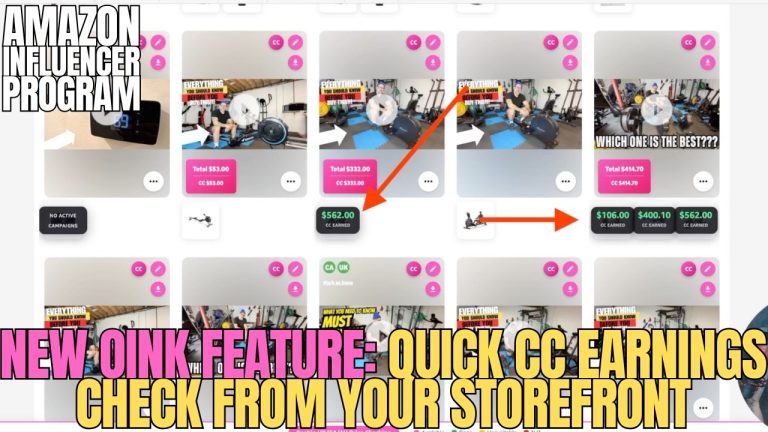
If you’ve ever tried to batch thumbnails for a morning of Amazon Influencer filming and felt like the thumbnail step was eating more time than the filming itself, I built something for you. The Oink Thumbnail Creator app is now live on iOS, and the Android version drops in about a week. It’s free for every Oink Pro subscriber, and it takes the exact thumbnail system I’ve been using to squeeze more on-site commissions out of my storefront and puts it on your phone so you can stop fighting with desktop tools.
Why I Built a Thumbnail App Instead of Another Web Tool
I’ve watched hundreds of Amazon Influencer workflows at this point, and the single biggest bottleneck after filming is thumbnails. You film ten products in a tight session, you pop them onto your storefront, and then you lose an hour messing around with Canva, cropping pack shots, grabbing Amazon images that look horrible at the storefront’s compressed size, and tweaking the same template over and over. Every minute you burn on thumbnails is a minute you’re not filming the next product, and on this program time is literally money.
So I stopped trying to bolt thumbnail generation onto the desktop extension and built a standalone mobile app that does one thing exceptionally well: crank out storefront-ready thumbnails in seconds, from the same phone you already have in your hand.
Why Thumbnails Actually Move the Needle on Amazon
Amazon’s storefront algorithm rewards videos that actually get watched. A shopper lands on your storefront, scans the grid, and their eyes go to the thumbnails that stand out. A bad thumbnail — one that’s just the Amazon product image at an odd crop, with no hook, no color pop, no human element — gets scrolled past. A sharp thumbnail pulls the click, the click pulls the view, the view drives the on-site commission. If you’ve been following my 5 Pillars system, thumbnails live inside Pillar 2: maximizing click-through on the videos you already filmed. It’s the cheapest quality-win on the platform because you don’t have to film a single new second to benefit from it.
What the New Oink Thumbs App Actually Does
Open the app, and the first thing you’ll notice is that it’s built around the way influencers actually work, not the way a generic design tool assumes you work. You can pull in a frame straight from a video you just shot, overlay a product image on top, drop in a preset text hook, and you’re done. No layers panel. No fiddling with opacity sliders. No five-minute tutorial. It’s opinionated in the right places so you move fast.
- Pull a background frame from a video clip or your camera roll in two taps
- Drop in a product image with an automatic cutout so it sits cleanly on the background
- Apply a text hook with presets tuned for storefront-grid readability at Amazon’s compressed size
- Export a storefront-ready thumbnail in the correct dimensions every time
- Save your own templates so the next ten thumbnails take seconds each
Free for Oink Pro — Here’s Why
I could have charged separately for this, and plenty of people told me I should. But the reason I rolled it into Oink Pro is that the app and the extension are better together. The extension already runs Storefront Cross Check, Unavailable Video Matching, and the Comparison Video Schedule — it knows which videos are pulling weight and which ones need help. The thumbnail app closes the loop: when the extension flags a video that’s under-performing, you tap through and regenerate a better thumbnail on the spot. One subscription, one ecosystem, one workflow.
If you’re already on Oink Pro, you’re not paying an extra dollar. Log into the App Store, search “Oink Thumbs,” and you’re in. Android users — give me about seven days and the Play Store version will be live.
How I Use It in My Own Filming Day
My actual workflow looks like this now. I film ten to fifteen products in a single morning, usually in one location so the lighting is consistent. I upload the raw videos to my storefront, and while Amazon is still processing them I open Oink Thumbs on my phone. I pull a hero frame from each video, drop the product shot, slap a hook on it — “Worth it?” “Under $20” “Surprising buy” — and export. By the time the storefront is done processing, every video has a thumbnail. Fifteen thumbnails in maybe twelve minutes.
Compare that to the old way — Canva on a laptop, fighting with Amazon product image resolution, re-uploading from phone to desktop to phone again — and I just gave myself back an hour every filming day. An hour I can use to film two or three more products, which then generate on-site commissions for years.
Thumbnail Mistakes I See Influencers Making Constantly
- Using the raw Amazon product image as the thumbnail. It’s already on the product page — nobody clicks a thumbnail that matches the photo right next to it.
- Text that’s unreadable at storefront-grid size. Always preview at small scale before committing.
- No human element. A hand holding the product, or you using it, outperforms flat pack shots by a wide margin.
- Inconsistent styling across your storefront. A grid that looks cohesive converts better than ten thumbnails that look like ten different creators shot them.
The app is opinionated enough to prevent most of these mistakes by default. The presets use legible text sizes, the cutout tool pulls you toward product-plus-context compositions, and the template save feature keeps your grid visually consistent without extra work.
What’s Coming Next
Version one ships with the core generator. Version two is already in the pipeline and will include batch generation — feed it a folder of product clips and get ten thumbnails back in one pass — plus deeper integration with the Oink extension so an underperforming video can prompt a thumbnail regen with a single tap. If you have feature requests, I want to hear them. This is the stage where user feedback bends the roadmap.
Grab the App Today
iOS users, search “Oink Thumbs” in the App Store, or use the direct link from our site. Android is next week. And if you’re not on Oink Pro yet, this is probably the cleanest time to grab a subscription — you’re getting the extension, the thumbnail app, and the rest of the Oink ecosystem for one price. Head to oinkforinfluencers.com to subscribe and stop leaving commissions on the table because your thumbnails weren’t pulling their weight.
I’ll see you on the next one.