If you’re creating content as an Amazon Influencer and you haven’t looked at Levanta yet, you’re probably leaving money on the table. I say that because I’ve been on both sides of this equation — promoting products purely for Amazon on-site commissions, and promoting the same products through Levanta’s off-site brand deals. The payout difference can be shocking, and most creators I talk to have no clue because they’ve never actually compared the two rates side by side on the exact same ASIN.
That’s why we built the Oink x Levanta integration the way we did. It’s not just another affiliate feed plugged into the dashboard. It’s a direct comparison tool that tells you, for a given product, whether you’d make more on Amazon’s standard commission or through Levanta’s brand-funded rate. In this article I’m going to walk through how I use it every day, why the Facebook group posting feature matters more than most people realize, and how to decide which link to use for which piece of content.
Why Levanta Exists in the First Place
Amazon’s creator commissions are capped by category. Beauty pays one rate, electronics pays another, and a handful of categories barely pay at all. Levanta is an affiliate network that lets brands selling on Amazon offer their own commissions on top of — or instead of — the Amazon on-site rate. Brands do this because they want creators promoting their specific ASINs, and they’re willing to pay more than Amazon’s default to get that attention.
The catch has always been discovery. You have to know which brands are on Levanta, which of their ASINs match the ones you’d want to create content for, and whether their rate actually beats what Amazon pays you anyway. Doing that manually across a few hundred products on your storefront is not a real workflow. It’s why most creators either go all-in on Levanta and miss Amazon categories where the on-site rate is actually higher, or they ignore Levanta completely and leave real commission dollars untouched.
What the Oink Comparison Actually Shows You
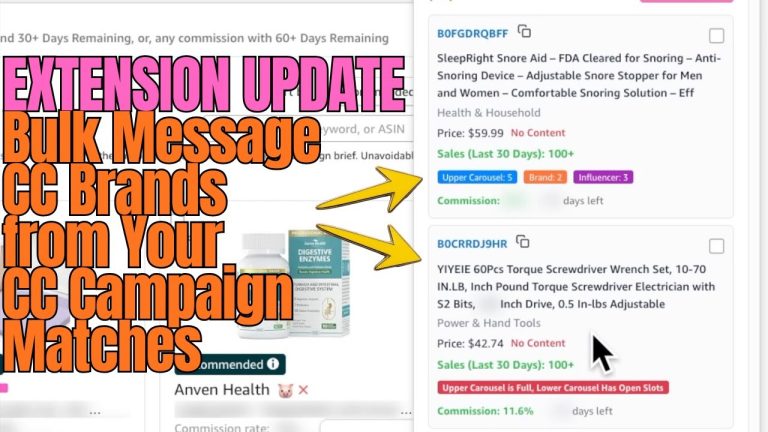
Inside Oink, when you load a product, we pull the current Amazon category commission rate and the Levanta rate for that specific ASIN (if a brand has it listed) side by side. You see three numbers that matter:
- Amazon on-site rate for that product’s category
- Levanta brand rate for that exact ASIN
- Whichever one wins, flagged clearly so you don’t have to do math in your head
You’d be surprised how often the answer flips depending on category. A kitchen gadget might pay better through Levanta because the brand is aggressively bidding for creators. A beauty product in the same cart might still pay better on the Amazon on-site rate. If you’re making a comparison video with six products in it, you could very easily end up with three links that should route through Levanta and three that should stay on Amazon. Before this feature existed, nobody was actually checking that.
The Facebook Group Posting Feature
The other piece we shipped alongside the comparison is FB group posting. This is a feature that a lot of creators have asked me about because posting into buyer-intent Facebook groups is still one of the highest-converting traffic sources for affiliate links. The problem is that doing it at scale — across multiple groups, with rotating products, without looking spammy — takes forever.
Oink now queues your product posts into the groups you’re a member of, lets you format the caption once, and handles the rotation so you’re not copying and pasting the same product into ten places on a Sunday night. It plays nicely with the Comparison Video Schedule, so the products you’ve already committed to making videos on can flow straight into your group posting queue with the right link (Amazon or Levanta, whichever Oink flagged as the higher payer).
How I Decide Which Link to Use
My rule of thumb is simple: use the link that pays more, unless there’s a strategic reason not to. That sounds obvious but creators overthink this constantly. Here’s my actual decision flow:
- Pull the product into Oink and check the comparison.
- If Levanta wins by a meaningful margin, use the Levanta link.
- If Amazon wins or it’s a wash, stay on Amazon so the click still contributes to my on-site metrics and storefront activity.
- If I’m making a shoppable video for Amazon’s carousel, I always use the Amazon link — off-site links don’t count toward on-site engagement requirements.
That last one catches people. If you’re trying to stay on top of your on-site tier and you’re routing every single click through Levanta, you may be hurting your Amazon standing to earn a slightly higher per-sale rate. This is the exact kind of tradeoff the 5 Pillars system inside Oink is designed to keep you aware of.
Where This Fits with Your Existing Oink Workflow
If you’re already using Oink, the Levanta comparison layer just shows up inside the screens you’re already looking at. It works alongside Storefront Cross Check, so when you’re scrubbing your idle list for products to reactivate, you can now see which of those have a Levanta brand rate waiting. It works with the Comparison Video Schedule, so when you’re planning next week’s videos you already know which products justify the extra production time because the payout is stronger. And it feeds Unavailable Video Matching, meaning if one of your old videos goes unavailable and you need to relink to an alternate ASIN, you can pick the replacement that pays the best.
The whole point is that Oink is built for how real Amazon Influencers actually work — not one feature at a time, but as one connected system. Adding Levanta to that system means one more number you don’t have to track manually.
What You Should Do This Week
If you’re a Pro user, go into Oink today, connect Levanta, and run the comparison on your top twenty earning products from last month. I guarantee at least a handful of those have a better Levanta rate you weren’t using. For those, update your links, and watch what happens to your next payout cycle.
If you’re not a Pro user yet, this is one of the features that makes the upgrade obvious. Beyond Levanta, Pro also unlocks the Comparison Video Schedule, FB group posting queue, and a number of other workflows that are specifically designed to squeeze more commission out of the same amount of content you’re already making.
Stop Guessing Which Link Pays More
The difference between a good month and a great month as an Amazon Influencer is rarely about working harder — it’s about routing the same clicks to the higher-paying destination. The Oink x Levanta comparison was built specifically for that. Head over to oinkforinfluencers.com to get set up, and if you’re already in, turn the Levanta comparison on and start using it on every new piece of content you make this week.