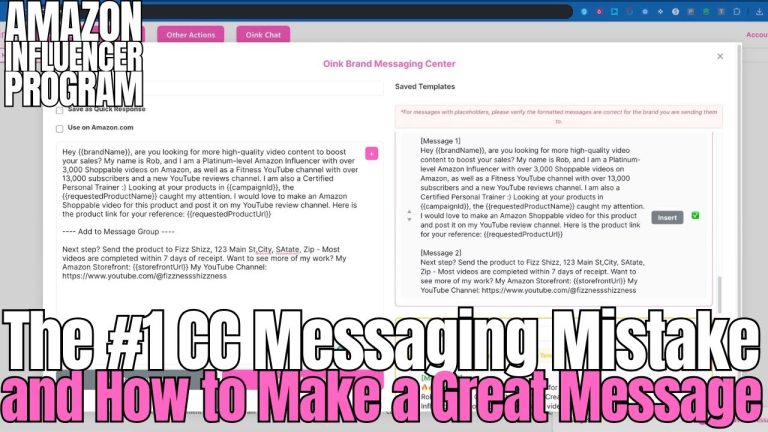
Want to get more free products through Creator Connections and increase your Amazon influencer income? The secret is researching and messaging brands directly from Amazon.com — not just scrolling through the Creator Connections dashboard. This is part two of a proven Creator Connections strategy that top influencers use every single day to land more collaboration opportunities on products that actually sell.
Table of Contents
- Why Research from the Amazon Side
- Setting Up Your Template
- Finding CC Products on Amazon
- Evaluating What You Find
- Messaging Brands Directly
- Making This Part of Your Daily Routine
Why Research from the Amazon Side
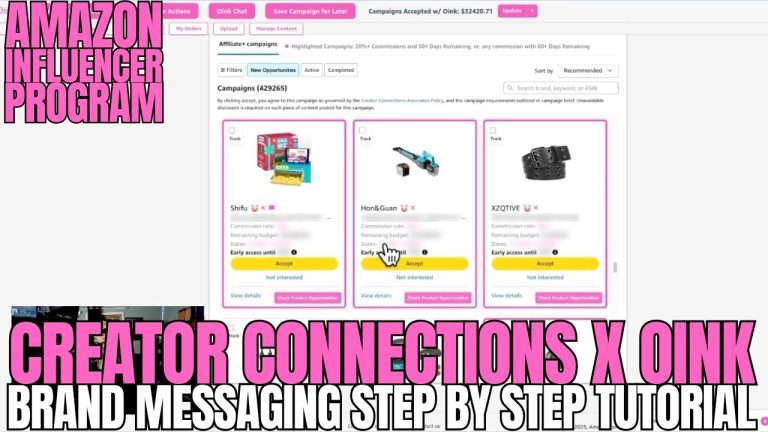
If you’ve been following the Creator Connections strategy, you already know that part one involves scrolling through the Creator Connections dashboard — finding products in pink, checking product opportunity, and targeting items that are actually selling. But the Amazon side is equally powerful, and for a different reason.
The Creator Connections dashboard is great because it exposes you to products you never would have thought of. It forces you to think outside the box. But the Amazon side gives you something the dashboard doesn’t: precision. You can target specific products, specific categories, and specific niches that you know perform well or are relevant to your audience.
The most successful influencers do both approaches every single day.
Setting Up Your Template
Before you start researching on Amazon, you need to set up a message template. This is important because generic messages to brands don’t work anymore. Your template needs to be specific, professional, and include your shipping address so that the brand only needs to respond once to get the product to you.
A few important formatting tips for your template: Amazon’s messaging system does not recognize manual line breaks. If you try to format your template with line breaks for your address, it’s going to turn into one long run-on sentence that looks messy. Write everything in sentence form instead — name, street address, city, state, zip — all flowing naturally in a paragraph. For tools that help automate this messaging process, check out the Oink for Influencers extension.
Finding CC Products on Amazon
Once your template is ready, it’s time to go to Amazon and start searching. Navigate to a category or search for a product type that you’re interested in. The key here is that you’re looking for products that have active Creator Connections campaigns.
When you run your search, look for products that have CC campaigns associated with them. You’ll be able to see important details like how many units the product has sold recently, the brand name, commission rates, and how many days are left on the campaign.
This is what makes the Amazon-side approach so powerful. You’re not randomly scrolling — you’re targeting exactly what you want based on categories, seasons, trends, or whatever matters to your strategy.
Evaluating What You Find
Once you’ve found products with CC campaigns, it’s time to filter your results. Here are the key criteria to focus on:
Sales Numbers
Remove anything that isn’t selling. If a product has zero sales in the last 30 days, it’s not worth your time. Remember the golden rule: only say yes to products that are actually moving.
Open Carousel Slots
Look for products that have open placement opportunities — meaning the carousel isn’t full yet. Products with fewer videos in the carousel mean less competition and more visibility for your content.
Campaign Duration
Prioritize campaigns with at least 60 days remaining. This gives you enough runway to receive the product, create your video, and earn commissions before the campaign expires.
Prior Conversations
Filter out brands you’ve already messaged. There’s no point in sending duplicate requests to brands you’ve already been in contact with.
Messaging Brands Directly
After you’ve filtered your results down to the products worth pursuing, it’s time to send your messages. Select the products you want, choose your pre-made template, and send them all at once.
The beauty of a good template is that it automatically customizes each message with the specific product name and brand name. This isn’t a generic blast — each brand receives a personalized message targeting their specific product, which dramatically increases your response rate compared to copy-paste generic outreach.
You can message multiple brands simultaneously, making this an incredibly efficient process. Five, ten, or even more brands can be contacted in a matter of minutes.
Making This Part of Your Daily Routine
The most successful Amazon influencers treat this as a daily habit. Part one (the CC dashboard) makes you discover products you never would have thought of. Part two (Amazon-side research) lets you be precise and targeted about what you want.
Together, these two approaches give you the best of both worlds — serendipitous discovery and strategic targeting. Make both of them part of your daily routine, and you’ll see a steady stream of collaboration products arriving at your door, all on products that are actually selling and can earn you real commissions.