Christine is a UGC creator with a solid Amazon Influencer storefront, and she volunteered it for one of my audits. Her videos look good, her demonstrations are strong, and her product picks are better than most. She’s also leaving money on the table in two very specific places. I audit every storefront the same way, on three questions: are you picking the right products, are you making videos that convert, and are you actually competing for the click once you land in a carousel? Here’s how Christine scored on all three, and what I told her to change.
In This Article
- The Three-Part Audit Framework
- The Green Flag: 80% of Products Are Actually Selling
- The Red Flag: Only 44% Have Creator Connections Campaigns
- Price Point, Sales Velocity, and Carousel Competition
- Upper Carousel Coverage Needs to Climb
- What She Gets Right in Her Videos
- Fix the First Five Seconds
- Thumbnails: Make the Product the Star
- Titles: Stop Answering the Question in the Title
The Three-Part Audit Framework
Every audit I do runs on the same three questions. First, product selection: are you picking good products or bad products? Good products equal good commission. Bad products, well, you get it. Second, video creation: once you’ve picked the product, are you making a video that connects with the buyer and actually converts? Third, competition: when your video lands in a product page carousel, is it set up to win the click over the other four videos sitting next to it?
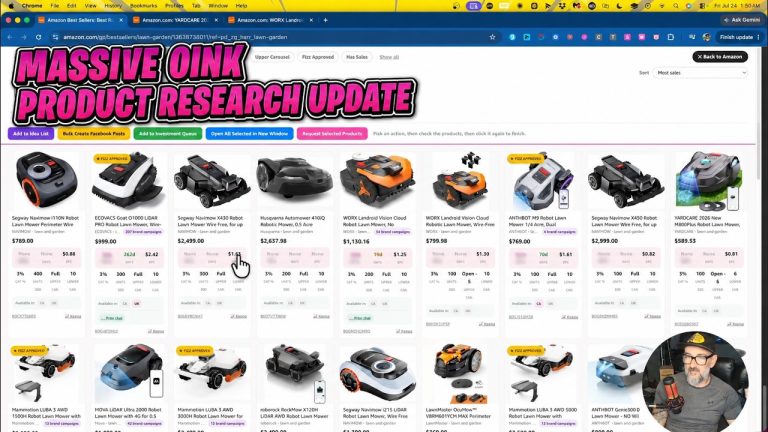
For the product side, I pull a Storefront Cross Check on the creator’s last 50 videos. That gives me a breakdown of the metrics that matter most on those products, which tells me what kind of products they’re selecting and what their strategy looks like, whether it’s intentional or not.
The Green Flag: 80% of Products Are Actually Selling
Right off the rip, Christine’s data had one green flag and one red flag. The green flag: out of her last 50 videos, 80% were on products that actually sold in the last 30 days. That’s a great number. Whether she’s doing it on purpose or not, she’s focusing on products that move, and that’s the first thing I want to see from anybody. A video on a product with no sales history is a video that can’t pay you no matter how good it is.
The Red Flag: Only 44% Have Creator Connections Campaigns
The red flag: only 22 of those 50 videos, 44%, were on products with an active Creator Connections campaign. If you’re trying to make money as an Amazon influencer with these videos, you have to be focused on Creator Connections. That 44% tells me it’s not a priority for her. She’s doing what she does and getting what she can get.
I want that number up around 80%. This is the single biggest takeaway from the whole audit and I anchored everything else to it. Creator Connections bonuses are where the on-site money gets multiplied, and a storefront where more than half the videos aren’t eligible for a bonus is a storefront working at half speed.
Price Point, Sales Velocity, and Carousel Competition
The rest of her product numbers look decent. Her average price point is about $23. That’s a little low, but I’m not a big believer that price matters much, so no takeaway there. When one of her products is selling, it’s selling an average of 4,000 units a month. That’s above the 2,500 to 3,500 range I typically see, and while it’ll probably come down over time, it’s a good number right now.
Where there is an upper carousel on her products, the average is 4.35 influencer videos already in it. The carousel maxes out at five, so that’s about normal. It bothers me a little in combination with the low Creator Connections number, but if she gets her campaign coverage up to 70% or 80%, I stop caring about this metric entirely.
Upper Carousel Coverage Needs to Climb
Sixty-seven percent of her products have an upper carousel. Call that a yellow flag, maybe beige. I’d like it closer to 80%. The more of your products that have an upper carousel, the more visibility your videos get. When a product doesn’t have one, the shopper has to scroll way down the page to find your video, and most buyers don’t have that kind of patience or even know that section exists. The takeaway is simple: filter for products that already have an upper carousel before you film. It’s one of the 5 Pillars for a reason.
What She Gets Right in Her Videos
On to the videos themselves. What buyers want from us is expertise, insight, authority, and demonstration. Christine nails the demonstration part. In almost every video she’s showing the product doing the thing it was made to do. The supplement organizer actually has supplements in it. The tripod gets fully set up on camera. That’s exactly right.
Her videos run about a minute and a half to two minutes, and in that time she’s also giving personal insight and experience, which is what builds authority with the buyer. Lighting is good and bright. She’s committed to a lavalier mic in nearly every video, and the handful where she skipped it stood out. Every video worth making is worth making well, so keep the mic with you. The one miss: a men’s clothing video where the shoes were never shown on a person. If you’re making a video for clothing, somebody needs to be wearing it the way a buyer would.
Fix the First Five Seconds
Here’s the change I’d make to her video structure. She usually opens with a nicety: “I’ve been using this for a while,” or “the brand sent me this.” That stuff is fine to say, but don’t lead with it. Lead with something that tells the buyer they picked the right video. Take her hyaluronic acid serum. What does that shopper want to know? Does it actually absorb into the skin, does it work, is it worth the money. So open with: “You’re probably here because you’re wondering if this serum actually works.”
If a buyer doesn’t feel like you’re going to answer their question within the first few seconds, they go watch somebody else’s video. Tell them “you’re in the right spot” first, then say the brand sent it to you, then get into the demo.
Thumbnails: Make the Product the Star
When your video does land in a carousel, you’ve got exactly two tools to fight for the click: the thumbnail and the title. The thumbnail is the movie poster for your video. Christine is already doing the smart thing by taking a deliberate photo with the product instead of letting Amazon auto-pick a frame (I showed her a competitor’s thumbnail where you can barely find the product at all).
Two refinements. First, in some thumbnails she takes up more of the frame than the product does. Hold the product up close to the camera and let it take up the square footage in the middle; you can be off to the side smiling. The product needs to be the obvious spotlight. Second, she was inconsistent about adding text to thumbnails. Pick one. Either commit to text-based thumbnails every time or go clean every time. Clean is what I’ve been doing lately, and it’s less to fuss over.
Titles: Stop Answering the Question in the Title
The title is your second chance to connect with the buyer by saying something they’re already wondering. On a hairbrush, that’s “Does this brush actually work?” Look at what her carousel competitors did on a travel blow-dry brush instead: “Fast and easy blowout with this dual voltage brush.” “The perfect travel hair dryer, compact but powerful.” They answered the shopper’s question in the title, so there’s no reason left to click. One said “hair volume tool” on a 19-second video, which does nothing.
Christine’s own title was “This hair tool was a lifesaver while overseas.” Closer, but she still gave away the ending. “I took this brush overseas. Here’s what happened.” creates curiosity. Give the buyer a reason to pick your video instead of handing them the conclusion for free.
Watch the full audit here:
Every number in this audit, from the 80% sales-history rate to the 44% Creator Connections coverage to the 4.35 carousel competitors, came straight out of Oink’s Storefront Cross Check. Run it on your own last 50 videos and you’ll see exactly where your storefront is leaking money. Get the extension at oinkforinfluencers.com.